Vsop
☆☆☆☆☆
(0 reviews)
Lowest price (incl. delivery)
34,00 USD
- Offers
- 2
- Last updated
- 1 tháng trước
| Người bán | Product price | Delivery | Tổng cộng | Tình trạng | Updated | |
|---|---|---|---|---|---|---|
| Monotype | Product price 15,00 USD | Delivery 19,00 USD | Tổng cộng 34,00 USD | Tình trạng Có sẵn | Updated 1 tháng trước | View offer |
| Fontspring | Product price 29,00 USD | Delivery free | Tổng cộng 29,00 USD | Tình trạng Có sẵn | Updated 2 tháng trước | View offer |
Giá và tình trạng có thể thay đổi. Cập nhật lần cuối: 19.08.2026 21:52.
0,0
☆☆☆☆☆
0 reviews
5★
0%
4★
0%
3★
0%
2★
0%
1★
0%
Product reviews
No reviews yet — be the first!
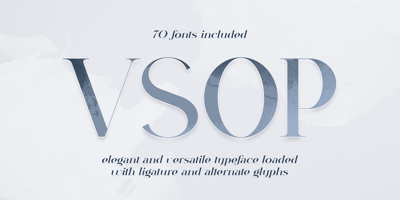
Vsop Font Family was designed by Vladimir Fedotov, Plamen Petrov and published by VP Creative Shop. Vsop contains 70 styles and family package options. Introducing VSOP - Elegant typeface. 70 font styles includedVSOP is elegant and timeless typeface loaded with 70 font styles (narrowest, narrower, narrow, regular, wide) 87 languages support, alternate and ligature glyphs to make you typography truly unique!Language Support : Afrikaans, Albanian, Asu, Basque, Bemba, Bena, Breton, Chiga, Colognian, Cornish, Czech, Danish, Dutch, Embu, English, Estonian, Faroese, Filipino, Finnish, French, Friulian, Galician, Ganda, German, Gusi,i Hungarian, Indonesian, Irish, Italian, Jola-Fonyi, Kabuverdianu, Kalenjin, Kamba, Kikuyu, Kinyarwanda, Latvian, Lithuanian, Lower Sorbian, Luo, Luxembourgish, Luyia, Machame, Makhuwa-Meetto, Makonde, Malagasy, Maltese, Manx, Meru, Morisyen, North Ndebele, Norwegian, Bokmål, Norwegian, Nynorsk, Nyankole, Oromo, Polish, Portuguese, Quechua, Romanian, Romansh, Rombo, Rundi, Rwa, Samburu, Sango, Sangu, Scottish, Gaelic, Sena, Shambala, Shona, Slovak, Soga, Somali, Spanish, Swahili, Swedish, Swiss, German, Taita, Teso, Turkish, Upper, Sorbian, Uzbek (Latin), Volapük, Vunjo, Walser, Welsh, Western Frisian, ZuluFEATURES Uppercase, lowercase, numeral, punctuation & Symbol ligature glyphs alternates Narrowest - regular, italic with 7 weights Narrower - regular, italic with 7 weights Narrow - regular, italic with 7 weights Regular - regular, italic with 7 weights Wide - regular, italic and styled with 7 weights Multilingual support - 87 languages No special software is required to type out the standard characters of the Typeface. How to access alternate glyphs?To access alternate glyphs in Adobe InDesign or Illustrator, choose Window Type & Tables GlyphsIn Photoshop, choose Window Glyphs. In the panel that opens, click the Show menu and choose Alternates for Selection. Double-click an alternate's thumbnail to swap them out.Feel free to contact me if you have any questions!Mock ups and backgrounds used are not included.Thank you! Enjoy!