Redmark
☆☆☆☆☆
(0 opinii)
Najniższa cena (z dostawą)
30,00 USD
Liczba ofert2
Ostatnia aktualizacja1 miesiąc temu
| Sprzedawca | Cena produktu | Dostawa | Razem | Dostępność | Aktualizacja | |
|---|---|---|---|---|---|---|
| Fontspring | Cena produktu 15,00 USD | Dostawa 15,00 USD | Razem 30,00 USD | Dostępność Dostępny | Aktualizacja 1 miesiąc temu | Zobacz ofertę |
| Monotype | Cena produktu 30,00 USD | Dostawa 29,00 USD | Razem 59,00 USD | Dostępność Dostępny | Aktualizacja 1 miesiąc temu | Zobacz ofertę |
Ceny i dostępność mogą ulec zmianie. Ostatnia aktualizacja: 19.08.2026 21:51.
0,0
☆☆☆☆☆
0 opinii
5★
0%
4★
0%
3★
0%
2★
0%
1★
0%
Opinie o produkcie
Brak opinii — bądź pierwszy!
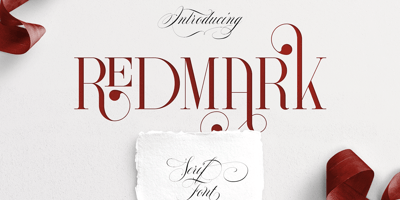
Redmark Font Family was designed by Vladimir Fedotov, Plamen Petrov and published by VP Creative Shop. Redmark contains 1 styles and family package options. Introducing Redmark - Elegant all caps serif fontRedmark is vintage yet clean font inspired from 80s typeface loaded with alternate and ligature glyphs to make you typography truly unique!Language Support : Belarusian, Bosnian, Bulgarian, Chechen, Macedonian, Russian, Serbian, Afrikaans, Albanian, Asu, Basque, Bemba, Bena, Breton, Chiga, Colognian, Cornish, Czech, Danish, Dutch, Embu, English, Estronian, Faroese, Filipino, Finnish, French, Friulian, Galician, Ganda, German, Gusii, Hungarian, Indonesian, Irish, Italian, Jola-Fonyi, Kabuverdianu, Kalenjin, Kamba, Kikuyu, Kinyarwadna, Litvian, Lithuanian, Lower Sorbian, Luo, Luxembourish, Luyia, Machame, Makhuwa-Meetoo, Makonde, Malagasy, Maltese, Manx, Meru, Morisyen, North Ndebele, Norwegian Bokm ål, Norwegian Nynorsk, Nyankole, Ormo, Polish, Portuguese, Quechua, Romanian, Romansh, Rombo, Rundi, Rwa, Samburu, Sango, Sangu, Scottish Gaelic, Sena, Shambala, Shona, Slovak, Soga, Somali, Spanish, Swahili, Swedish, Swiss German, Taita, Teso, Turkish, Ukrainian, Upper Sorbian, Uzbek (Latin), Volap ük, Vunjo, Walser, Welsh, Western Frisian, ZuluFEATURES Uppercase, numeral, punctuation & Symbol ligature glyphs alternates Multilingual support - 95 languages No special software is required to type out the standard characters of the Typeface. How to access alternate glyphs?To access alternate glyphs in Adobe InDesign or Illustrator, choose Window Type & Tables GlyphsIn Photoshop, choose Window Glyphs. In the panel that opens, click the Show menu and choose Alternates for Selection. Double-click an alternate's thumbnail to swap them out.Feel free to contact me if you have any questions!Mock ups and backgrounds used are not included.Thank you! Enjoy!